Globals contain a drop-down list of categories that can be used for configuring Lariat items for all users throughout the entire system. These are the 24 options available for configuration. Note that your list of options may differ, depending on what modules you have installed.
|
|
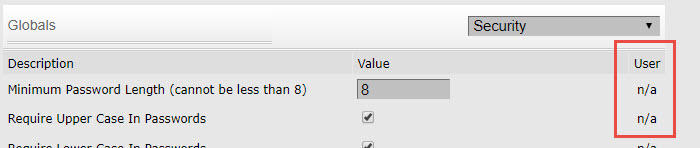
The User column on the right side of each screen in the Global area will allow the user to set user specific parameters. This option will show up under the User tab on the main menu bar. This is an all or nothing scenario, meaning if the user box is checked then all users will be able to configure this option for their personal preferences.
Globals > Main > contains 53 settings > This area lists general program settings. We will explain some of the settings and the effect it will have throughout the system:
- Language: English is the only available option at this time
- Initial Account Number Last # Used: Input the initial account number used by Lariat and displays the last account number currently in use.
- The maximum number of debtor accounts is currently 2,147,483,647.
- Receive Event Notifications: Turn event notifications on.
- Automatic Logout Time: Lariat has an automatic timeout that will log an inactive user out after the specified period of time. If the amount of time for the automatic log out is left at 0 or blank it will do nothing.
- Common times are: 30 min; 60 min; 240 min; 480 min; 1440 min.
- Default Letter: When adding a new debt this letter is used.
- Default Event Notification Remind Time: When no remind time is chosen this default time will be used, this is directly related to the Remind button in the notification screen.
- Resolution: The size of the screen to be displayed on your monitor.
- Default Next Debtor Contact Date: When an agent saves or applies a change to a debtor record on the call screen, the next contact date is automatically advanced by this number. This can be set to default at 1 through 365 days, weeks or months.
- Default Next Contact Time: When an agent saves or applies a change to a debtor record on the call screen, the next contact time is automatically set to the default specified in this area.
- Records Per Page: Number of records to display within the Debtor Browse and Search areas.
- Phone Link Style: This is the internet phone API style used for phone numbers if you have a softphone installed on your computer. Valid options are: Tel, Sip, Skype, or Vcard.
- Date Format: The format in which dates will appear.
- Prefer dd/mm/yyyy Format Dates: Checkbox will set date format to dd/mm/yyyy
- Currency Symbol: The symbol that will appear in front of currency.
- Display Translate link: When checked a link will appear for translation of fields from one language to another through a translate web page.
- Default % of Total Debt for PTP Amount: This is the default percentage of total debt to be set for a Promise To Pay amount. This default amount is displayed on the Promise To Pay screen when an agent is ready to record a promise to pay from a debtor. The agent, when entering the PTP, can change this default amount.
- Automatically Focus Form Fields: The cursor will be placed in the first input field on a screen.
- Call Screen Client Info: Displays the client information panel at the bottom of the Call Screen.
- Allow Agents To Browse Debtors: Allows the agent to have access to the Debtor Browse screen. If you do not want agents to have this capability, clear the check box and agents will be taken directly to the Call Screen when they log in.
- Allow Call Screen Navigation without Updating: This feature allows an agent to navigate in the call screen without updating the current debtor record. If unchecked the agent is forced to enter some information prior to being allowed to move to the next debtor.
- Add Interest To New Debts: When checked this will add interest to all new debts as they are added to the system.
- Minimum Payment: This is the minimum amount to be accepted for a payment from a debtor.
- Allow Transaction Back Posting: This value allows you to post a transaction with a date previous to the current date. You can set the default at 1 through 365 days, weeks or months.
- Promise To Pay Grace Period: If a transaction made on a PTP falls within the number of days entered here, the PTP is kept, not broken.
- Payment Schedule Broken Status: When doing daily maintenance, if a payment schedule is marked as inactive, then all the debts associated with that payment schedule are changed to the status chosen here.
- Default Debt Status: When entering a debt, this is the default status on the add debt screen. Default Initial Placement: The transaction type value for new debts when entered into the system is displayed here. This is for display purposes only.
- Tax All Revenue: When checked this will add tax to any revenue.
- Service Tax: Allows for the input of a service tax amount.
- Default Country: Used in the address areas throughout the system.
- Default Debtor Uniqueness: This applies to the Debtor Forms. You may choose any combination of the following: Name (always on), Tax ID, Birth date, Primary Phone and Secondary Phone. If you attempt to enter a debtor that already exists in the system, a message stating, "A debtor has been found with matching information. Add this debtor anyway?" At that time you can cancel the entry or override and save the information.
- Enable Fuzzy Duplicate Check: When checked this enables the duplicate debtor feature in Lariat.
Fuzzy Duplicate Threshold: Allows a numerical threshold to be entered that is used when performing duplicate debtor checking. The higher the number the more exact the two debtor records must be to be judged a duplicate. The fuzzy duplicate score is a scoring system designed to make a best guess at how likely it is that two debtors are duplicates. It is meant to take something like Bob Smith at 1234 Main Street and match it to Robert Smith at 1234 Main St.
To do this, we do several tests and sum up an overall score. The first step is to determine the minimum threshold score that you want to have reported as a possible duplicate (default 1000). The minimum score is theoretically zero, but the likelihood of that is almost nil (even Jane Smith and Jack Johnson have one letter in common). The maximum score is 1900 plus the minimum threshold (so default max score is 2900). The reason the maximum score varies with the value of the threshold is we assume that anything with a matching tax ID should be investigated, so two debtors having a matching tax ID adds the minimum threshold value to their fuzzy test score.
Scoring is based on numerous fields, including debtor name, birth date, address and phone information, and the tax ID. The more closely the information matches, the more score is added. For example, an individual debtor can have a maximum of 500 points added if the first and last names are an identical match. If they are slightly different, they will get only a portion of that score. As an example, take Bob Smith and Robert Smith. These two would get 316 out of 500 possible points on a name match. But Rob Smith and Robert Smith would get 363 out of 500.
Once all the scoring is done, the sum of the scores for the individual tests is summed up and compared to the threshold. Based on default threshold, the following will give you an idea of what to expect from the results.
1000-1200 – Possible match, but something critical is missing. Expect to see things like spouses with the same address, people with similar names and addresses (Roger Smith vs Robert Smith), or duplicates with no tax ID. A significant portion of this range will be false positives.
1200-1900 – Very likely a match, at this range, most false positives are debtors with erroneous tax ID, or spouses with similar first names (Jane and John).
1900+ – Extremely likely a match, any score above this requires multiple key fields to be very similar as well as a matching tax ID.
Globals > PDF > 10 settings for formatting of PDF files. These types of files are used in letters and Lariat looks at these settings when generating the files.
• File Name: This is the temporary file name that is used during the PDF generation process. While this option is available, do NOT change it.
• File Path: The temporary path in Lariat that is used for creating the PDF file during file creation. While this option is available, do NOT change it.
• All other available options: These are all options that are typical printing options but can be overridden when creating the letters.
Globals > Letters > 4 settings for printing letters from Lariat.
Lariat-ASP Letter

Lariat-IP Letter
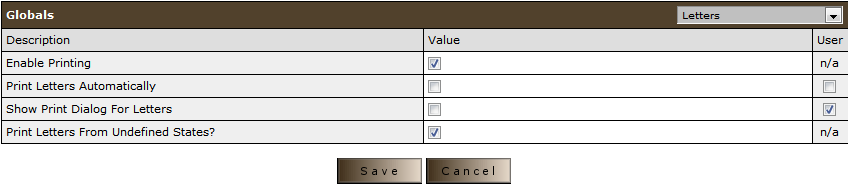
Enable Printing: Allow printing to take place
Print Letters Automatically: A letter is generated from the Call Screen it will print immediately. If not enabled when a letter is generated, it is held in the Mass Mail Print queue until an administrator chooses to print the letters.
Show Print Dialog for Letters: When a Lariat letter is generated, a pop up dialog will appear in the Call Screen asking the agent whether they want to print the letter
Print Letters from Undefined States: This enables you to print letters for all states regardless of the individual states setting in the Company area.
Globals > Reports > 1 setting that sets Debtors Per Page for Reports: This designates how many debtors will print on each report. This is a legacy feature and has been overridden in the Reports feature.
Globals > Security > 5 settings Minimum Password Length: Allows the administrator to set the minimum length required for user passwords. The typical length of a password is between 6 to 10 characters containing alpha and numeric characters.
Globals > Themes > 5 settings used for the different color settings throughout Lariat. This is a good area to give the users access on the User tab so they may choose their own colors.
Highlight Color for Accounts with Payment Due Today: When a Promise To Pay is due on the current date this is the color displayed.
Highlight Color for Past Due Accounts: This color is used for broken promises.
Flashline Background Color: The color used for the flashline background.
Flashline Font Color: The font color for the flashline.
When choosing colors for the flashline, make sure different colors are chosen for the foreground and background, otherwise the verbiage won’t be readable.
Globals > Credit Reporting > 3 settings The Lariat Metro credit reporting module uses these parameters to determine if a specific debt will be reported. If a debt does not meet these requirements it will not be reported.
Global > Forwarding Agency > two color choices: 1) Color for debtors containing debt forwarded to Full Service agency and 2) Color for debtors containing debt forwarded to Commission Split Only Agency
Globals > Note Logging > three choices
no text yet
Globals > Email Settings >
no text yet
Global > User Defined Fields >
no text yet
Globals > Transaction Preferences settings > 9 settings which determine which debts are paid on and/or in what order:
• Processing fee distribution: can set how they want processing fees to be attached to which debts:
o Split equally - the processing fee for a transaction will be split equally between all debts included in the transaction
o Single - the processing fee for a transaction will be applied to any single debt that omes included in the transaction (Greg said it would likely be whichever one came up first in the loop)
o Single low - the processing fee for a transaction will be applied to the single debt with the lowest balance included in the transaction
o Single high - the processing fee for a transaction will be applied to the single debt with the highest balance included in the transaction
• Debt repayments priority: determines which debts are paid off and in what order if multiple debts are selected for repayment. This setting must adhere to the payment priority set on agency config. Note: if the aging dates are the same for two debts, which one is paid first likely depends on the age of the entire debt record in the database, NOT just the listed date in the UI.
o Round Robin is a payment method where a single payment is distributed evenly across all selected debts.
o Oldest aging - debt with the oldest aging date is paid first
o Newest aging - debt with the newest aging date is paid first
o Highest Balance - debt with the highest balance is paid first
o Lowest Balance - debt with the lowest balance is paid first
• Allow multiple payment plans per debts
• Send email when transaction late:
• Number of days until Transaction is Late
• Email Template - Transaction Late
• Send Email When Transaction Missed
• Number of days until Transaction is Missed
• Email Template - Transaction Missed
Globals > Client Portal > 28 settings
Settings for Products
Globals > CRM > 1 setting
no text yet
Globals > Branding > 4 settings
You are able to upload your own logo for your company. This allows users, clients and debtors to visually see who your are. Not only can it be seen on screens but also printed in letters and sent in emails.
Golbals > ePay CC/ACH > 13 settings
no text yet
Globals > Letter Processing Module > 10 Settings
no text yet
Globals > SMS > 16 Settings
no text yet
Globals > Events > 8 Settings
no text yet
Globals > Reminders > 18 Settings
no text yet
Globals > Notifications > 3 Settings
no text yet
Globals > Classic UI > 3 Settings
no text yet
Globals > Payment Portal > 3 Settings
no text yet
Globals > Postalocity >
no text yet
Globals > Debtor Portal > 1 Setting
no text yet
Globals > SFTP >
no text yet