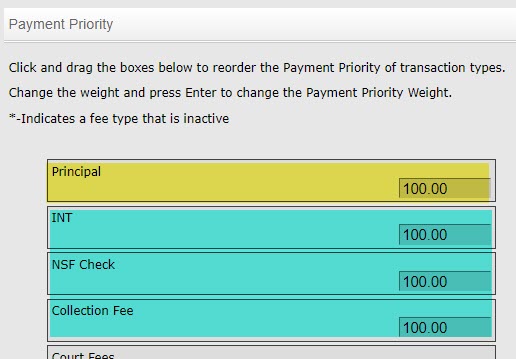
When you create a Debt Adjustment (DBAdjustment) or a Credit Adjustment (CRAdjustment) it will honor the payment priorities* that you have set in Lariat. The first pay priority is to apply the adjustment to the principle up to 100% of the current principle amount.
The reason for this behavior is to prevent overpayments on principle when there is a payment or a CRAdjustment made. And while this works best with a CRAdjustment, special care needs to be given when making a DBAdjustment. Let’s look at how each works within these rules.
Example #1
CRAdjustment - used to decrease a debt and / or fee amount with a debtor.
- The Principle is $50, and we are going to decrease the debt using a CRAdjustment of $100.
- Payment priority is principal first at 100%
- So, 100% of the $100 would be applied to the principal but only up to 100% of the current principal amount, which is $50. The principal would decrease to a $0 total, instead of the entire $100 to a -$50.
The remainder of the $50 would follow the pay priorities until it is all applied. This is an example of the desired behavior, when the adjusted amount is equal to or more than line item for principle.
Example #2
DBAdjustment - used to increase a debt and / or fee amount with a debtor.
- Principle is $50, and we are going to increase the debt using a DBAdjustment of $100
- Payment priority is principal first at 100%
- So, 100% of the $100 would be applied to the principal only up to 100% of the current principal amount which is $50. The principal would increase by $50 to a total balance of $100, instead of to $150.
Since we can only adjust up within the balances that exist on each line item per the pay priority, we are limited in how much the principle can be raised. If you were to just reconcile this, it would not reflect the new debt of $150. You must override and force the entire $100 to go into the principle line item.
How to override a transaction amount
An override provides you with the tools you need to increase the debt beyond what the pay priorities allow. And even though the override steps can apply to a CRAdjustment, it is even more important with DBAdjustments as that is more likely to cause issues when adding adjustments. Here is how to override an adjustment:
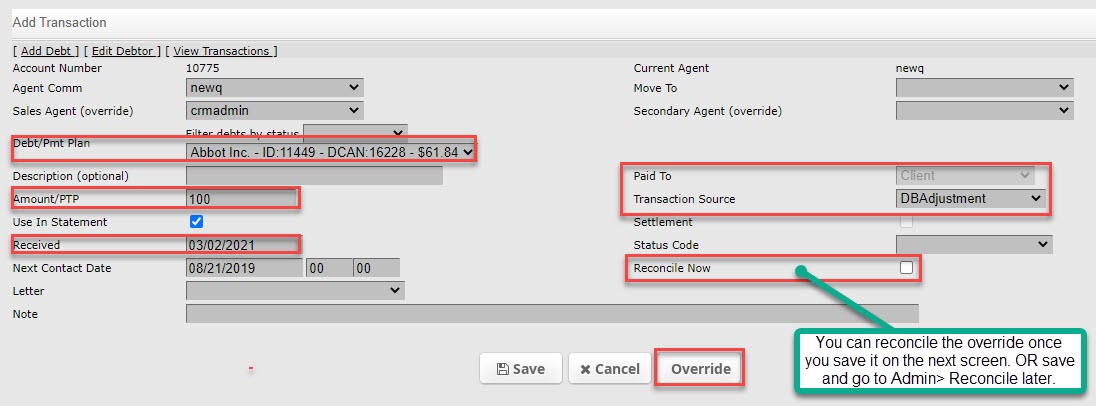
- Create a DBAdjustment go to admin > debtor > add transaction
- Fill in required fields and backdate the received date, if needed
- Click override button
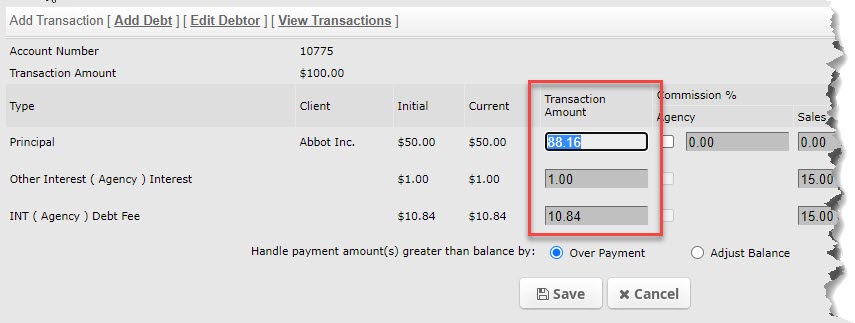
- Assign the adjusted amounts to the proper line items.
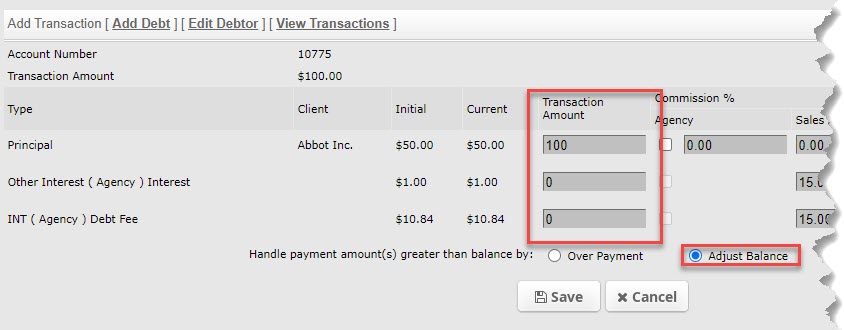
- Be sure to save AND THEN reconcile the adjustment. You can reconcile the adjustment at this time or go to admin > reconcile.
If you make a mistake in applying these adjustments, you can remove them easily. Go to view transactions and click on the X next to adjustment action.
* NOTE: client level payment priorities will override the payment priority set in agency config > payment priorities.