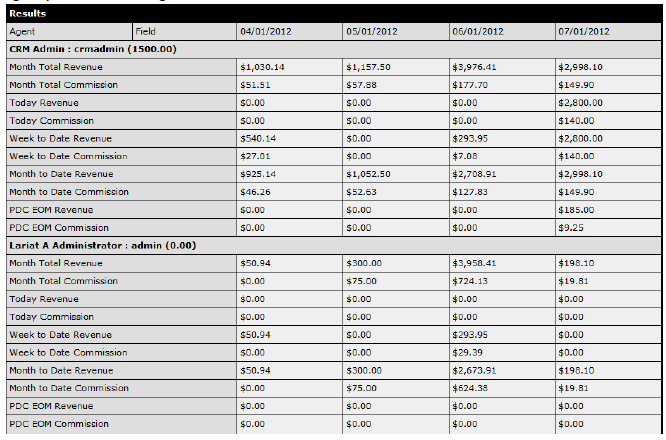
This area contains company and agent statistics with the ability to view and export the agent data.

Company Statistics
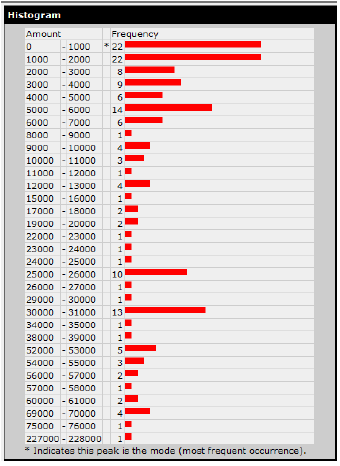
The Company Statistics screen includes a snapshot of real-time, agency-level statistics and a Histogram providing a graphic overview of the total number of debts by amounts and frequency.
Company Statistics Defined
| Total Debtors | Total number of debtors |
| Number Of Debts | Total number of debts |
| Avg. Debts Per Debtor | Average number of debts per debtor |
| Total Agents | Total number of agents |
| Avg. Debtors Per Agent | Average number of debtors assigned to each agent |
| Total Value Of Debts | Total value of all outstanding debts. This value is created by subtracting total payments in the system from the total debts. |
| Median Debt Value | Middle value of the distribution of all debts (or average of the two middle items if there are even numbers of debts). Although the median is less efficient than the mean, it is less sensitive to outliers than the mean. |
| Mean Debt Value | The 'arithmetic mean' (or average) is calculated by summing the values in the continuous distribution of debt values and dividing by the total number of debts. This is generally more efficient than the median but outliers have a more profound effect on the value. |
| Mode of Debt Values | Most common value in the set of debts. Two values are provided for the mode: Buckets The values of the debt are sorted into "buckets" or "bins". In this way, two debts with amounts differing by a small amount are evaluated as the same value. Generally, this will provide the best mode for the dataset. Raw Values The values of the debt are evaluated "as is". This will often result in a "multimodal" value, which means that multiple values have the same number of occurrences. |
| Max Debt | The largest debt |
| Min Debt | The smallest debt |
| Range | Provides the range of debts calculated by subtracting the minimum debt from the maximum debt. |
| 25th Percentile | A percentile rank is the proportion of scores in a distribution that a specific score is greater than or equal to. In this case, the value is greater than or equal to 25% of the debts. |
| 75th Percentile | The value listed is greater than or equal to 75% of the debts |
| Semi-Interquartile Range | The traditional range is flawed because a single outlier can drastically alter the measure of spread. The semi-interquartile range is calculated by discarding the bottom 25% and top 25% of the values and considering only the middle 50% of values. This is done by subtracting the 25th percentile from the 75th percentile values. |
| Semi-Interquartile Deviation | Provides a measure of how the values are spread out from the mean. This deviation is calculated by taking half the value of the Semi-Interquartile Range. |
| Standard Deviation | This statistic tells how far, on average, any debt differs from the average mean value of the dataset. In other words, if you pick a debt at random, what would be a reasonable guess of how far that debt is from the mean value. |
| Skew | Provides a measure of how far positive or negative for the value of the debts. A positive skew means there are high-valued debts that affect the other measures of central tendency. A negative skew indicates the reverse. A skew approaching or reaching zero makes the dataset a good candidate for a normal (Gaussian) distribution. |
| Company Statistics Screen left side | Company Statistics Screen right side |
 |
 |
Agent Statistics
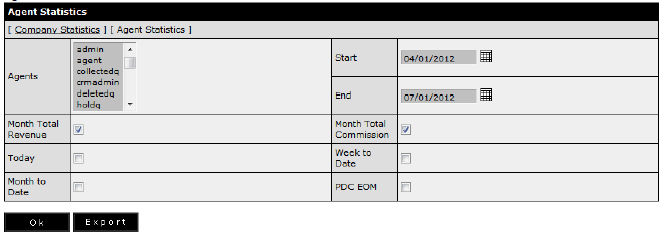
This area displays the selected agent commissions for a given date range.
Agents – select one or many agents
Start – first month
End – last month
Month Total Revenue – agency revenue
Month Total Commission – agent commission
Today – agency revenue and agent commission
Week to Date – agency revenue and agent revenue for the week to the current day
Month to Date – agency revenue and agent revenue for the month to the current day
PDC EOM – future transactions for agency revenue and agent commission
If the agent has a deferred amount it will be displayed to the right of the agent name. Deferred amount is located in the Admin / Agent section.
Agency Revenue and Agent Commission screen